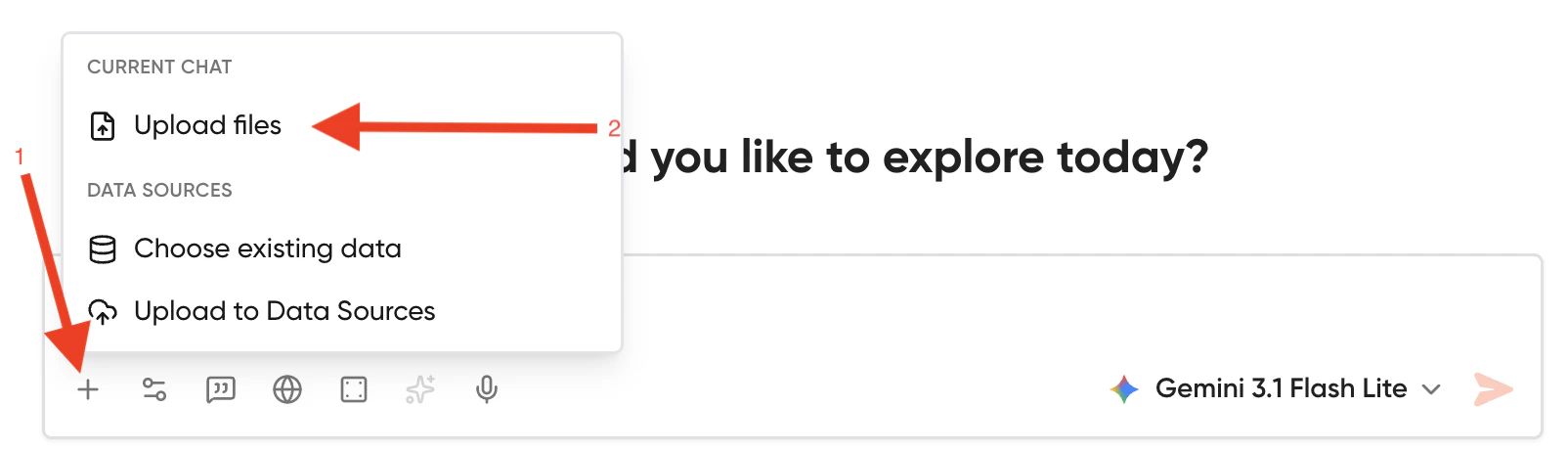
Geekflare Chat allows you to attach a variety of files to chat with LLMs for analysis, data extraction, and visual processing. You can attach these files by dragging them into the chat input box or clicking the + icon.Documentation Index
Fetch the complete documentation index at: https://docs.geekflare.com/llms.txt
Use this file to discover all available pages before exploring further.

List of Supported File Types
Documents & Presentations
.pdf(Portable Document Format).docx(Microsoft Word).pptx(Microsoft PowerPoint).txt(Plain Text).md(Markdown)
Spreadsheets & Data
.xlsx(Microsoft Excel).csv(Comma-Separated Values)
Code & Configuration
.json,.yaml,.yml,.ini(Configuration).html,.css(HTML and CSS).py,.js,.ts,.tsx(Python, JavaScript, and TypeScript)
Images & Visuals
.jpg,.jpeg,.png,.webp.svg(Scalable Vector Graphics)
How File Attachments Affect Credit Usage
To keep chat usage fair, Geekflare Chat calculates credit usage based on the size of the files you attach. The standard base cost of any AI model covers up to 10,000 tokens. To help estimate, 1 token is roughly equal to 4 English characters. Therefore, 10,000 tokens is approximately 40,000 characters, or roughly 7,500 words. If your attached files exceed this 10,000-token threshold, a multiplier is applied to the base cost of the AI model you are using. We calculate the multiplier using this formula: Multiplier = ⌈ Total Tokens / 10000 ⌉ Example Scenarios- Under 10K Tokens (approx. under 40,000 characters): The file fits within the standard context. The multiplier is 1. If your selected AI model costs 15 credits per prompt, you are charged exactly 15 credits.
- Large File (e.g., 30,000 tokens / approx. 120,000 characters): A 3x multiplier is applied. If your selected AI model costs 15 credits per prompt, the total cost for that prompt will be 45 credits.