


Why is there an extra cost?
AI models do not automatically remember past messages like a human does. Every time you send a new message in an ongoing chat, Geekflare Chat has to send your entire conversation history back to the AI so it understands the context. As your chat gets longer, the AI has to read and process significantly more text for every single reply. This requires more computing power, which increases the cost.How long context impact credits?
Our standard credit usage is based on conversations up to 10,000 tokens (roughly 7,500 words). When your chat history stays under this limit, you only pay the standard base credit rate per message. Once your conversation grows beyond this 10,000-token threshold, each new message will consume additional credits to cover the extra processing power required by the AI to read the long chat history.How to manage and keep your credit usage low?
- Start a new chat: The easiest way to save credits is to start a fresh chat whenever you change topics or no longer need the AI to remember the earlier messages.
- Keep conversations focused: Try to limit single chat threads to a specific task. Once the task is complete, move on to a new chat.
- Reduce chat memory: By default, we send previous 10 messages to LLM. You can further reduce to lower the overall context.
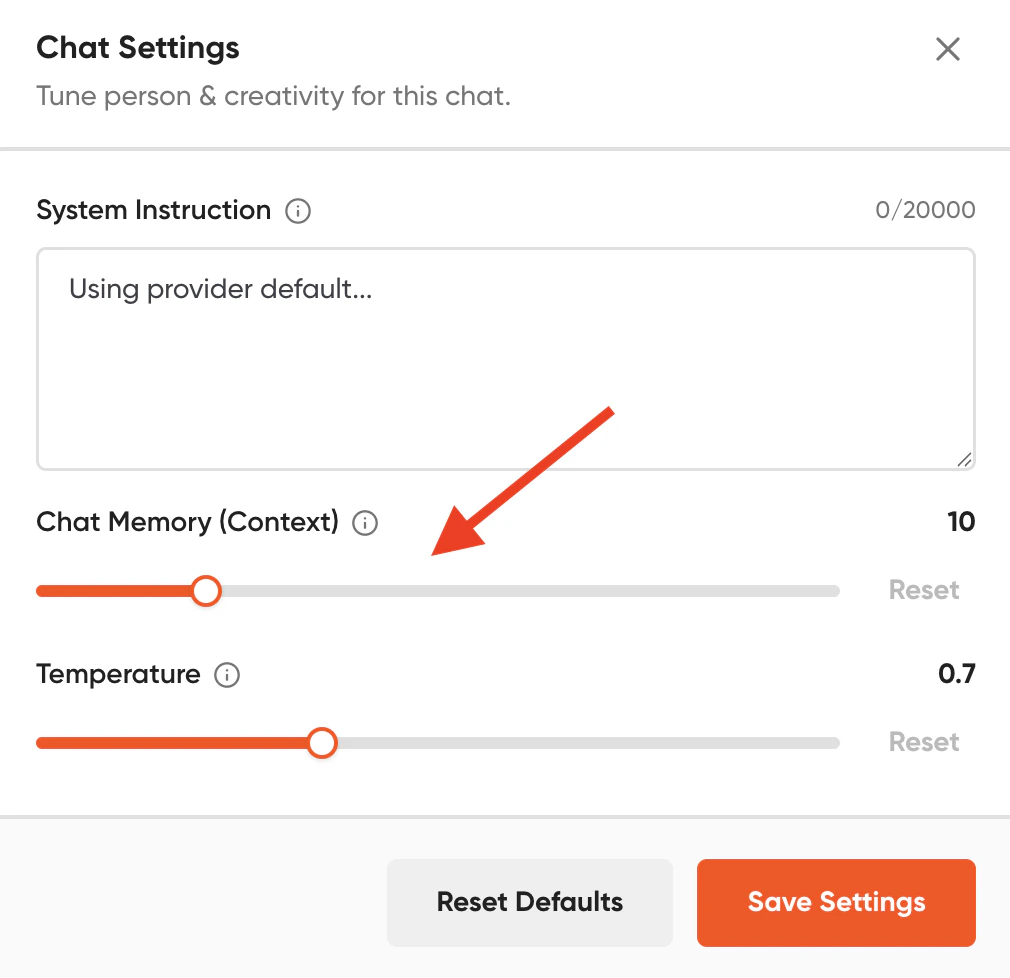
- Enable Compact Context Mode: If you need to keep the conversation going but want to save on costs, turn on Compact Context Mode under Chat Settings. This feature summarizes older messages for the AI to remember the core details of your conversation while reducing the credit usage.